Language support
DocuSeal offers broad language support to ensure a seamless experience for users around the world. The DocuSeal user dashboard is available in 7 languages, while the signing form supports 14 languages. This makes DocuSeal accessible and user-friendly for a global audience.
- DocuSeal user dashboard languages
- DocuSeal signing form languages
- How to change your interface language
DocuSeal user dashboard languages
The user dashboard is currently available in:
- English
- Spanish
- Italian
- German
- French
- Portuguese
- Dutch
DocuSeal signing form languages
The DocuSeal signing form is available in 14 languages, ensuring global accessibility and seamless document signing. The signing form language is picked automatically based on the signer’s browser language.
- English
- Spanish
- Italian
- German
- French
- Portuguese
- Arabic
- Ukrainian
- Dutch
- Polish
- Korean
- Hebrew
- Czech
- Japanese
When signing and filling out documents, DocuSeal accepts and correctly displays field values in PDFs with characters from various language scripts and alphabets:
- Latin
- Cyrillic
- Chinese (simplified)
- Japanese
- Korean
- Arabic
- Devanagari
- Bengali
- Tamil
- Punjabi
- Vietnamese
- Thai
- Greek
- Hebrew
- Armenian
- Georgian
How to change your interface language
To change the interface language:
- Log in to your DocuSeal account.
- Click Settings in the top right corner.
- From the right-hand menu, select Account.
- In the Language dropdown, choose your preferred language from the list.
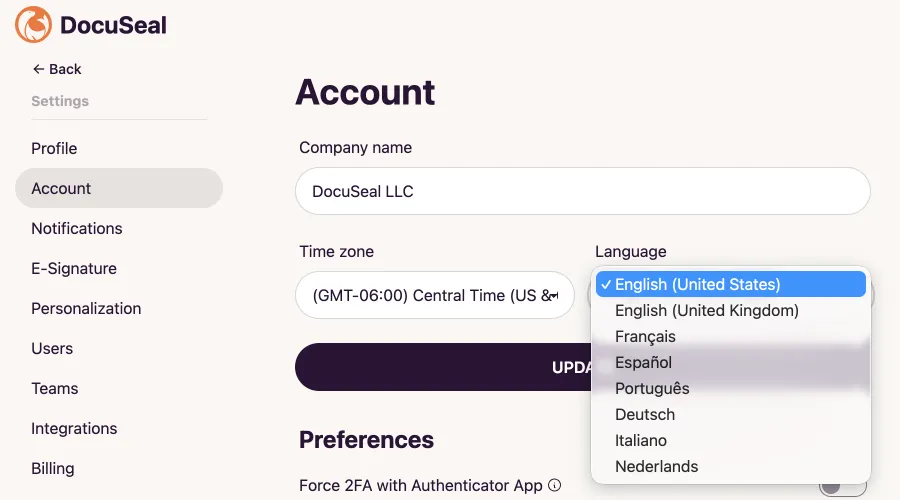
Tip: Prefer the DD/MM/YY date format? Set your account language to “English (UK)” and DocuSeal will use DD/MM/YY format automatically.